
Integra tu sistema con Avify usando nuestra API GraphQL y REST. Consulta productos, gestiona inventario, crea órdenes y más.
https://sandboxapi.avify.co/graphql https://sandboxapi.avify.co/api/v1/... Header: api-key: TU_TOKEN Autenticación
Configuración inicial
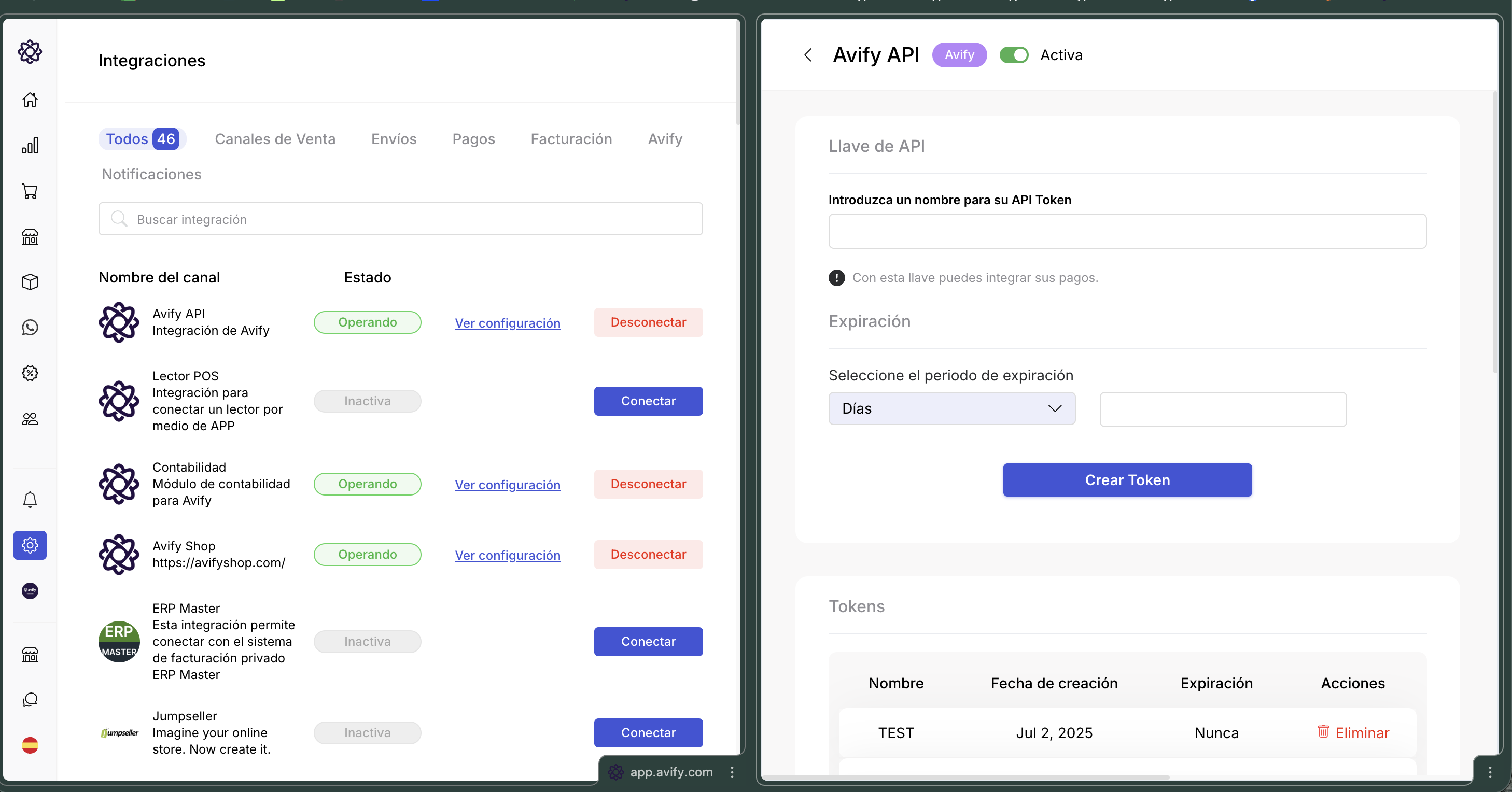
- Ingresa a app.avify.com
- Navega a Configuración → Integraciones → API
- Genera un nuevo token y cópialo
- Agrega el header
api-key: TU_TOKENen cada petición
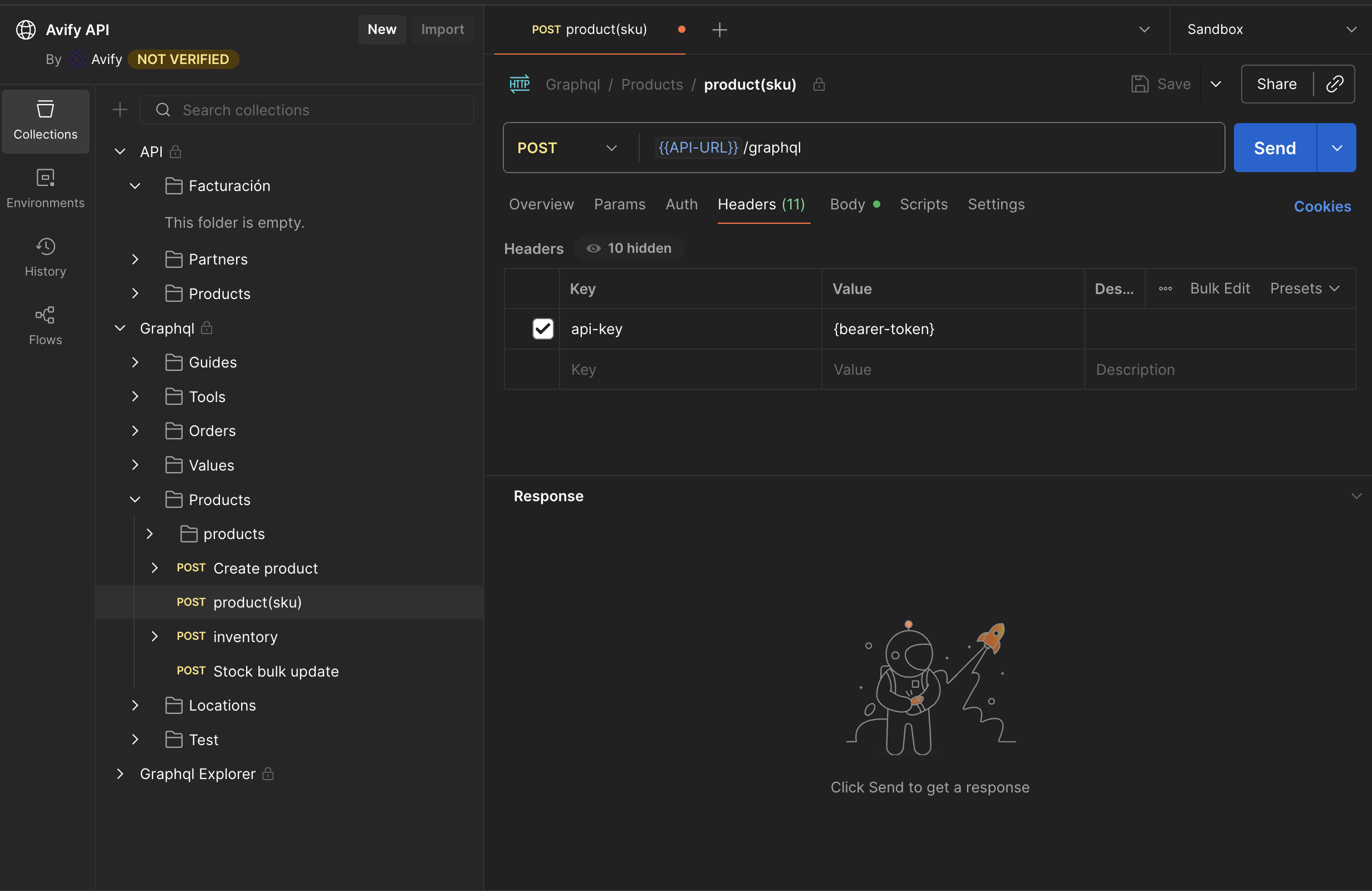
Importante: La API de Avify no utiliza Bearer tokens. Solo necesitas enviar el header api-key con tu token en cada petición.
Autenticación
Todas las peticiones a la API de Avify requieren un token de autenticación. El token se envía como header `api-key` en cada request.
El token se genera desde el panel de Avify en Configuración > Integraciones > API. No uses Bearer, solo el header api-key. curl -X POST 'https://sandboxapi.avify.co/graphql' \
-H 'Content-Type: application/json' \
-H 'api-key: TU_TOKEN' \
-d '{"query":"query {\n apiTest\n}","variables":{}}'const response = await fetch('https://sandboxapi.avify.co/graphql', {
method: 'POST',
headers: {
'Content-Type': 'application/json',
'api-key': 'TU_TOKEN'
},
body: JSON.stringify({
query: `query {
apiTest
}`,
})
});
const { data, errors } = await response.json();
console.log(data);import requests
url = "https://sandboxapi.avify.co/graphql"
headers = {
"Content-Type": "application/json",
"api-key": "TU_TOKEN"
}
query = """
query {
  apiTest
}
"""
response = requests.post(url, json={
"query": query
},
headers=headers
)
data = response.json()
print(data)<?php
$url = 'https://sandboxapi.avify.co/graphql';
$headers = [
'Content-Type: application/json',
'api-key: TU_TOKEN'
];
$body = '{
"query": "query {\n apiTest\n}"
}';
$ch = curl_init($url);
curl_setopt($ch, CURLOPT_POST, true);
curl_setopt($ch, CURLOPT_HTTPHEADER, $headers);
curl_setopt($ch, CURLOPT_POSTFIELDS, $body);
curl_setopt($ch, CURLOPT_RETURNTRANSFER, true);
$response = curl_exec($ch);
curl_close($ch);
$data = json_decode($response, true);
print_r($data);{
"data": {
"apiTest": "API is working! Store: Mi Tienda (store_id: 12345)"
}
}Presiona "Ejecutar" para enviar la petición.Verificar Conexión (apiTest)
Usa esta query para verificar que tu token está configurado correctamente y que puedes conectarte a la API.
Si recibes un error de autenticación, verifica que el header api-key esté correctamente configurado. curl -X POST 'https://sandboxapi.avify.co/graphql' \
-H 'Content-Type: application/json' \
-H 'api-key: TU_TOKEN' \
-d '{"query":"query {\n apiTest\n}","variables":{}}'const response = await fetch('https://sandboxapi.avify.co/graphql', {
method: 'POST',
headers: {
'Content-Type': 'application/json',
'api-key': 'TU_TOKEN'
},
body: JSON.stringify({
query: `query {
apiTest
}`,
})
});
const { data, errors } = await response.json();
console.log(data);import requests
url = "https://sandboxapi.avify.co/graphql"
headers = {
"Content-Type": "application/json",
"api-key": "TU_TOKEN"
}
query = """
query {
  apiTest
}
"""
response = requests.post(url, json={
"query": query
},
headers=headers
)
data = response.json()
print(data)<?php
$url = 'https://sandboxapi.avify.co/graphql';
$headers = [
'Content-Type: application/json',
'api-key: TU_TOKEN'
];
$body = '{
"query": "query {\n apiTest\n}"
}';
$ch = curl_init($url);
curl_setopt($ch, CURLOPT_POST, true);
curl_setopt($ch, CURLOPT_HTTPHEADER, $headers);
curl_setopt($ch, CURLOPT_POSTFIELDS, $body);
curl_setopt($ch, CURLOPT_RETURNTRANSFER, true);
$response = curl_exec($ch);
curl_close($ch);
$data = json_decode($response, true);
print_r($data);{
"data": {
"apiTest": "API is working! Store: Mi Tienda (store_id: 12345)"
}
}Presiona "Ejecutar" para enviar la petición.Productos
Listar Productos
Obtiene una lista paginada de productos con sus variantes, opciones, categorías e inventario.
UsaselectMode: "S"para obtener una respuesta simplificada. OmitelocationIdpara obtener inventario global.
curl -X POST 'https://sandboxapi.avify.co/graphql' \
  -H 'Content-Type: application/json' \
  -H 'api-key: TU_TOKEN' \
  -d '{"query":"query products($pageNum: Int, $pageSize: Int, $filters: Filters, $skus: [String], $locationId: Int, $selectMode: ProductSelectMode) {\n  products(\n    pageNum: $pageNum\n    pageSize: $pageSize\n    filters: $filters\n    skus: $skus\n    locationId: $locationId\n    selectMode: $selectMode\n  ) {\n    products {\n      id\n      sku\n      name\n      slug\n      status\n      type\n      customSku\n      price\n      cost\n      salePrice\n      taxPrice\n      taxPercentage\n      qty\n      reserved\n      onDemand\n      weight\n      brand\n      description\n      categories {\n        id\n        label\n        parentId\n      }\n      children {\n        id\n        name\n        sku\n        customSku\n        price\n        salePrice\n        qty\n        status\n        attributes {\n          code\n          value\n        }\n        variantOptions {\n          id\n          name\n          type\n          attributeCode\n          values {\n            id\n            label\n            productsSku\n            visual\n          }\n        }\n      }\n      variantOptions {\n        id\n        attributeCode\n        name\n        type\n        values {\n          id\n          label\n          productsSku\n          visual\n        }\n      }\n      options {\n        id\n        title\n        type\n        required\n        values {\n          id\n          title\n          price\n        }\n      }\n    }\n    pageSize\n    totalCount\n  }\n}","variables":{"pageNum":1,"pageSize":10,"locationId":null,"selectMode":"S"}}'
const response = await fetch('https://sandboxapi.avify.co/graphql', {
method: 'POST',
headers: {
'Content-Type': 'application/json',
'api-key': 'TU_TOKEN'
},
body: JSON.stringify({
query: `query products($pageNum: Int, $pageSize: Int, $filters: Filters, $skus: [String], $locationId: Int, $selectMode: ProductSelectMode) {
products(
pageNum: $pageNum
pageSize: $pageSize
filters: $filters
skus: $skus
locationId: $locationId
selectMode: $selectMode
) {
products {
id
sku
name
slug
status
type
customSku
price
cost
salePrice
taxPrice
taxPercentage
qty
reserved
onDemand
weight
brand
description
categories {
id
label
parentId
}
children {
id
name
sku
customSku
price
salePrice
qty
status
attributes {
code
value
}
variantOptions {
id
name
type
attributeCode
values {
id
label
productsSku
visual
}
}
}
variantOptions {
id
attributeCode
name
type
values {
id
label
productsSku
visual
}
}
options {
id
title
type
required
values {
id
title
price
}
}
}
pageSize
totalCount
}
}`,
variables: {
"pageNum": 1,
"pageSize": 10,
"locationId": null,
"selectMode": "S"
}
})
});
const { data, errors } = await response.json();
console.log(data);import requests
url = "https://sandboxapi.avify.co/graphql"
headers = {
"Content-Type": "application/json",
"api-key": "TU_TOKEN"
}
query = """
query products($pageNum: Int, $pageSize: Int, $filters: Filters, $skus: [String], $locationId: Int, $selectMode: ProductSelectMode) {
  products(
    pageNum: $pageNum
    pageSize: $pageSize
    filters: $filters
    skus: $skus
    locationId: $locationId
    selectMode: $selectMode
  ) {
    products {
      id
      sku
      name
      slug
      status
      type
      customSku
      price
      cost
      salePrice
      taxPrice
      taxPercentage
      qty
      reserved
      onDemand
      weight
      brand
      description
      categories {
        id
        label
        parentId
      }
      children {
        id
        name
        sku
        customSku
        price
        salePrice
        qty
        status
        attributes {
          code
          value
        }
        variantOptions {
          id
          name
          type
          attributeCode
          values {
            id
            label
            productsSku
            visual
          }
        }
      }
      variantOptions {
        id
        attributeCode
        name
        type
        values {
          id
          label
          productsSku
          visual
        }
      }
      options {
        id
        title
        type
        required
        values {
          id
          title
          price
        }
      }
    }
    pageSize
    totalCount
  }
}
"""
response = requests.post(url, json={
"query": query,
"variables": {
"pageNum": 1,
"pageSize": 10,
"locationId": null,
"selectMode": "S"
}
},
headers=headers
)
data = response.json()
print(data)<?php
$url = 'https://sandboxapi.avify.co/graphql';
$headers = [
'Content-Type: application/json',
'api-key: TU_TOKEN'
];
$body = '{
"query": "query products($pageNum: Int, $pageSize: Int, $filters: Filters, $skus: [String], $locationId: Int, $selectMode: ProductSelectMode) {\n products(\n pageNum: $pageNum\n pageSize: $pageSize\n filters: $filters\n skus: $skus\n locationId: $locationId\n selectMode: $selectMode\n ) {\n products {\n id\n sku\n name\n slug\n status\n type\n customSku\n price\n cost\n salePrice\n taxPrice\n taxPercentage\n qty\n reserved\n onDemand\n weight\n brand\n description\n categories {\n id\n label\n parentId\n }\n children {\n id\n name\n sku\n customSku\n price\n salePrice\n qty\n status\n attributes {\n code\n value\n }\n variantOptions {\n id\n name\n type\n attributeCode\n values {\n id\n label\n productsSku\n visual\n }\n }\n }\n variantOptions {\n id\n attributeCode\n name\n type\n values {\n id\n label\n productsSku\n visual\n }\n }\n options {\n id\n title\n type\n required\n values {\n id\n title\n price\n }\n }\n }\n pageSize\n totalCount\n }\n}",
"variables": {
"pageNum": 1,
"pageSize": 10,
"locationId": null,
"selectMode": "S"
}
}';
$ch = curl_init($url);
curl_setopt($ch, CURLOPT_POST, true);
curl_setopt($ch, CURLOPT_HTTPHEADER, $headers);
curl_setopt($ch, CURLOPT_POSTFIELDS, $body);
curl_setopt($ch, CURLOPT_RETURNTRANSFER, true);
$response = curl_exec($ch);
curl_close($ch);
$data = json_decode($response, true);
print_r($data);{
"data": {
"products": {
"products": [
{
"id": 1340391,
"sku": "23745b04-a3c8-4fe6-9064-ffaafefde50d",
"name": "Tenis Deportivos",
"slug": "tenis-deportivos",
"status": "active",
"type": "configurable",
"customSku": "TD-001",
"price": 1500,
"cost": 800,
"salePrice": null,
"taxPrice": 1695,
"taxPercentage": 13,
"qty": 50,
"reserved": 2,
"onDemand": false,
"weight": 0.5,
"brand": "Nike",
"description": "Tenis deportivos para running",
"categories": [
{
"id": 10,
"label": "Calzado",
"parentId": null
}
],
"children": [],
"variantOptions": [],
"options": []
}
],
"pageNum": 1,
"pageSize": 10,
"totalCount": 156
}
}
}Presiona "Ejecutar" para enviar la petición.Obtener Producto por SKU
Obtiene un producto específico usando su SKU único, incluyendo inventario detallado por ubicación.
Importante: Para usar esta query necesitas un SKU válido. Primero ejecuta Listar Productos para obtener el camposkude un producto existente y úsalo como valor de$skue$inventoryProductSku. Esta query combinaproducteinventoryen una sola petición. Ambos parámetros SKU suelen ser iguales.
curl -X POST 'https://sandboxapi.avify.co/graphql' \
  -H 'Content-Type: application/json' \
  -H 'api-key: TU_TOKEN' \
  -d '{"query":"query product($sku: String!, $inventoryProductSku: String!) {\n  product(sku: $sku) {\n    id\n    sku\n    createdAt\n    updatedAt\n    type\n    status\n    name\n    slug\n    origin\n    url\n    customSku\n    downloadable\n    visibility\n    description\n    longDescription\n    brand\n    price\n    cost\n    taxPrice\n    taxPercentage\n    taxClassId\n    salePrice\n    saleTaxPrice\n    weight\n    qty\n    reserved\n    onDemand\n    categories {\n      id\n      label\n      parentId\n    }\n    children {\n      id\n      name\n      sku\n      customSku\n      price\n      salePrice\n      qty\n      status\n      attributes {\n        code\n        value\n      }\n    }\n    variantOptions {\n      id\n      attributeCode\n      name\n      type\n      values {\n        id\n        label\n        productsSku\n        visual\n      }\n    }\n  }\n  inventory(sku: $inventoryProductSku) {\n    base {\n      global\n      onDemand\n      minSaleQty\n      name\n      sku\n      stockByLocation {\n        locationId\n        locationName\n        qty\n        reservations\n      }\n    }\n    children {\n      global\n      onDemand\n      name\n      sku\n      stockByLocation {\n        locationId\n        locationName\n        qty\n        reservations\n      }\n    }\n  }\n}","variables":{"sku":"23745b04-a3c8-4fe6-9064-ffaafefde50d","inventoryProductSku":"23745b04-a3c8-4fe6-9064-ffaafefde50d"}}'
const response = await fetch('https://sandboxapi.avify.co/graphql', {
method: 'POST',
headers: {
'Content-Type': 'application/json',
'api-key': 'TU_TOKEN'
},
body: JSON.stringify({
query: `query product($sku: String!, $inventoryProductSku: String!) {
product(sku: $sku) {
id
sku
createdAt
updatedAt
type
status
name
slug
origin
url
customSku
downloadable
visibility
description
longDescription
brand
price
cost
taxPrice
taxPercentage
taxClassId
salePrice
saleTaxPrice
weight
qty
reserved
onDemand
categories {
id
label
parentId
}
children {
id
name
sku
customSku
price
salePrice
qty
status
attributes {
code
value
}
}
variantOptions {
id
attributeCode
name
type
values {
id
label
productsSku
visual
}
}
}
inventory(sku: $inventoryProductSku) {
base {
global
onDemand
minSaleQty
name
sku
stockByLocation {
locationId
locationName
qty
reservations
}
}
children {
global
onDemand
name
sku
stockByLocation {
locationId
locationName
qty
reservations
}
}
}
}`,
variables: {
"sku": "23745b04-a3c8-4fe6-9064-ffaafefde50d",
"inventoryProductSku": "23745b04-a3c8-4fe6-9064-ffaafefde50d"
}
})
});
const { data, errors } = await response.json();
console.log(data);import requests
url = "https://sandboxapi.avify.co/graphql"
headers = {
"Content-Type": "application/json",
"api-key": "TU_TOKEN"
}
query = """
query product($sku: String!, $inventoryProductSku: String!) {
  product(sku: $sku) {
    id
    sku
    createdAt
    updatedAt
    type
    status
    name
    slug
    origin
    url
    customSku
    downloadable
    visibility
    description
    longDescription
    brand
    price
    cost
    taxPrice
    taxPercentage
    taxClassId
    salePrice
    saleTaxPrice
    weight
    qty
    reserved
    onDemand
    categories {
      id
      label
      parentId
    }
    children {
      id
      name
      sku
      customSku
      price
      salePrice
      qty
      status
      attributes {
        code
        value
      }
    }
    variantOptions {
      id
      attributeCode
      name
      type
      values {
        id
        label
        productsSku
        visual
      }
    }
  }
  inventory(sku: $inventoryProductSku) {
    base {
      global
      onDemand
      minSaleQty
      name
      sku
      stockByLocation {
        locationId
        locationName
        qty
        reservations
      }
    }
    children {
      global
      onDemand
      name
      sku
      stockByLocation {
        locationId
        locationName
        qty
        reservations
      }
    }
  }
}
"""
response = requests.post(url, json={
"query": query,
"variables": {
"sku": "23745b04-a3c8-4fe6-9064-ffaafefde50d",
"inventoryProductSku": "23745b04-a3c8-4fe6-9064-ffaafefde50d"
}
},
headers=headers
)
data = response.json()
print(data)<?php
$url = 'https://sandboxapi.avify.co/graphql';
$headers = [
'Content-Type: application/json',
'api-key: TU_TOKEN'
];
$body = '{
"query": "query product($sku: String!, $inventoryProductSku: String!) {\n product(sku: $sku) {\n id\n sku\n createdAt\n updatedAt\n type\n status\n name\n slug\n origin\n url\n customSku\n downloadable\n visibility\n description\n longDescription\n brand\n price\n cost\n taxPrice\n taxPercentage\n taxClassId\n salePrice\n saleTaxPrice\n weight\n qty\n reserved\n onDemand\n categories {\n id\n label\n parentId\n }\n children {\n id\n name\n sku\n customSku\n price\n salePrice\n qty\n status\n attributes {\n code\n value\n }\n }\n variantOptions {\n id\n attributeCode\n name\n type\n values {\n id\n label\n productsSku\n visual\n }\n }\n }\n inventory(sku: $inventoryProductSku) {\n base {\n global\n onDemand\n minSaleQty\n name\n sku\n stockByLocation {\n locationId\n locationName\n qty\n reservations\n }\n }\n children {\n global\n onDemand\n name\n sku\n stockByLocation {\n locationId\n locationName\n qty\n reservations\n }\n }\n }\n}",
"variables": {
"sku": "23745b04-a3c8-4fe6-9064-ffaafefde50d",
"inventoryProductSku": "23745b04-a3c8-4fe6-9064-ffaafefde50d"
}
}';
$ch = curl_init($url);
curl_setopt($ch, CURLOPT_POST, true);
curl_setopt($ch, CURLOPT_HTTPHEADER, $headers);
curl_setopt($ch, CURLOPT_POSTFIELDS, $body);
curl_setopt($ch, CURLOPT_RETURNTRANSFER, true);
$response = curl_exec($ch);
curl_close($ch);
$data = json_decode($response, true);
print_r($data);{
"data": {
"product": {
"id": 1340391,
"sku": "23745b04-a3c8-4fe6-9064-ffaafefde50d",
"name": "Tenis Deportivos",
"type": "configurable",
"status": "active",
"price": 1500,
"cost": 800,
"qty": 50,
"categories": [
{
"id": 10,
"label": "Calzado",
"parentId": null
}
]
},
"inventory": {
"base": {
"global": 50,
"onDemand": false,
"name": "Tenis Deportivos",
"sku": "23745b04-a3c8-4fe6-9064-ffaafefde50d",
"stockByLocation": [
{
"locationId": 308,
"locationName": "Bodega Central",
"qty": 30,
"reservations": 1
},
{
"locationId": 1099,
"locationName": "Tienda Cartago",
"qty": 20,
"reservations": 1
}
]
},
"children": []
}
}
}Presiona "Ejecutar" para enviar la petición.Crear Producto
Crea un nuevo producto base con precios, impuestos, categorías y stock inicial opcional.
El camposkuse genera automáticamente. UsacustomSkupara tu código interno. EltaxClassIdaplica el impuesto configurado en tu tienda.
curl -X POST 'https://sandboxapi.avify.co/graphql' \
  -H 'Content-Type: application/json' \
  -H 'api-key: TU_TOKEN' \
  -d '{"query":"mutation createBaseProduct($createBaseProductInput: CreateBaseProductInput!, $stock: CreateStockInput) {\n  createBaseProduct(\n    createBaseProductInput: $createBaseProductInput\n    stock: $stock\n  ) {\n    id\n    sku\n    name\n    status\n    price\n    taxPrice\n  }\n}","variables":{"createBaseProductInput":{"name":"Tenis Deportivos para Hiking","status":"active","salesChannelsStatus":"active","pricing":{"price":1000,"cabys":"","cost":500,"taxClassId":"default","salePrice":null,"salePriceFrom":null,"salePriceTo":null},"categories":[10],"description":"Tenis deportivos ideales para senderismo","longDescription":"<p>Tenis de alta calidad para hiking y senderismo.</p>","brand":"OutdoorPro","weight":0.8,"visibility":"catalog_search","customSku":"TDH-001"},"stock":{"locations":[{"locationId":308,"qty":25}]}}}'
const response = await fetch('https://sandboxapi.avify.co/graphql', {
method: 'POST',
headers: {
'Content-Type': 'application/json',
'api-key': 'TU_TOKEN'
},
body: JSON.stringify({
query: `mutation createBaseProduct($createBaseProductInput: CreateBaseProductInput!, $stock: CreateStockInput) {
createBaseProduct(
createBaseProductInput: $createBaseProductInput
stock: $stock
) {
id
sku
name
status
price
taxPrice
}
}`,
variables: {
"createBaseProductInput": {
"name": "Tenis Deportivos para Hiking",
"status": "active",
"salesChannelsStatus": "active",
"pricing": {
"price": 1000,
"cabys": "",
"cost": 500,
"taxClassId": "default",
"salePrice": null,
"salePriceFrom": null,
"salePriceTo": null
},
"categories": [
10
],
"description": "Tenis deportivos ideales para senderismo",
"longDescription": "<p>Tenis de alta calidad para hiking y senderismo.</p>",
"brand": "OutdoorPro",
"weight": 0.8,
"visibility": "catalog_search",
"customSku": "TDH-001"
},
"stock": {
"locations": [
{
"locationId": 308,
"qty": 25
}
]
}
}
})
});
const { data, errors } = await response.json();
console.log(data);import requests
url = "https://sandboxapi.avify.co/graphql"
headers = {
"Content-Type": "application/json",
"api-key": "TU_TOKEN"
}
query = """
mutation createBaseProduct($createBaseProductInput: CreateBaseProductInput!, $stock: CreateStockInput) {
  createBaseProduct(
    createBaseProductInput: $createBaseProductInput
    stock: $stock
  ) {
    id
    sku
    name
    status
    price
    taxPrice
  }
}
"""
response = requests.post(url, json={
"query": query,
"variables": {
"createBaseProductInput": {
"name": "Tenis Deportivos para Hiking",
"status": "active",
"salesChannelsStatus": "active",
"pricing": {
"price": 1000,
"cabys": "",
"cost": 500,
"taxClassId": "default",
"salePrice": null,
"salePriceFrom": null,
"salePriceTo": null
},
"categories": [
10
],
"description": "Tenis deportivos ideales para senderismo",
"longDescription": "<p>Tenis de alta calidad para hiking y senderismo.</p>",
"brand": "OutdoorPro",
"weight": 0.8,
"visibility": "catalog_search",
"customSku": "TDH-001"
},
"stock": {
"locations": [
{
"locationId": 308,
"qty": 25
}
]
}
}
},
headers=headers
)
data = response.json()
print(data)<?php
$url = 'https://sandboxapi.avify.co/graphql';
$headers = [
'Content-Type: application/json',
'api-key: TU_TOKEN'
];
$body = '{
"query": "mutation createBaseProduct($createBaseProductInput: CreateBaseProductInput!, $stock: CreateStockInput) {\n createBaseProduct(\n createBaseProductInput: $createBaseProductInput\n stock: $stock\n ) {\n id\n sku\n name\n status\n price\n taxPrice\n }\n}",
"variables": {
"createBaseProductInput": {
"name": "Tenis Deportivos para Hiking",
"status": "active",
"salesChannelsStatus": "active",
"pricing": {
"price": 1000,
"cabys": "",
"cost": 500,
"taxClassId": "default",
"salePrice": null,
"salePriceFrom": null,
"salePriceTo": null
},
"categories": [
10
],
"description": "Tenis deportivos ideales para senderismo",
"longDescription": "<p>Tenis de alta calidad para hiking y senderismo.</p>",
"brand": "OutdoorPro",
"weight": 0.8,
"visibility": "catalog_search",
"customSku": "TDH-001"
},
"stock": {
"locations": [
{
"locationId": 308,
"qty": 25
}
]
}
}
}';
$ch = curl_init($url);
curl_setopt($ch, CURLOPT_POST, true);
curl_setopt($ch, CURLOPT_HTTPHEADER, $headers);
curl_setopt($ch, CURLOPT_POSTFIELDS, $body);
curl_setopt($ch, CURLOPT_RETURNTRANSFER, true);
$response = curl_exec($ch);
curl_close($ch);
$data = json_decode($response, true);
print_r($data);{
"data": {
"createBaseProduct": {
"id": 1340500,
"sku": "auto-generated-uuid",
"name": "Tenis Deportivos para Hiking",
"status": "active",
"price": 1000,
"taxPrice": 1130
}
}
}Presiona "Ejecutar" para enviar la petición.Consultar Inventario
Obtiene el inventario detallado de un producto por SKU, incluyendo stock por ubicación y variantes.
basecontiene el inventario del producto padre.childrencontiene el inventario de cada variante.
curl -X POST 'https://sandboxapi.avify.co/graphql' \
  -H 'Content-Type: application/json' \
  -H 'api-key: TU_TOKEN' \
  -d '{"query":"query inventory($sku: String!) {\n  inventory(sku: $sku) {\n    base {\n      global\n      onDemand\n      minSaleQty\n      name\n      sku\n      stockByLocation {\n        locationId\n        locationName\n        qty\n        reservations\n        reorderPoint\n        lowStockAlertEnabled\n      }\n    }\n    children {\n      global\n      onDemand\n      minSaleQty\n      name\n      sku\n      stockByLocation {\n        locationId\n        locationName\n        qty\n        reservations\n        reorderPoint\n        lowStockAlertEnabled\n      }\n    }\n  }\n}","variables":{"sku":"3306f310-ec13-452c-8cb7-aac7bfbf7ce5"}}'
const response = await fetch('https://sandboxapi.avify.co/graphql', {
method: 'POST',
headers: {
'Content-Type': 'application/json',
'api-key': 'TU_TOKEN'
},
body: JSON.stringify({
query: `query inventory($sku: String!) {
inventory(sku: $sku) {
base {
global
onDemand
minSaleQty
name
sku
stockByLocation {
locationId
locationName
qty
reservations
reorderPoint
lowStockAlertEnabled
}
}
children {
global
onDemand
minSaleQty
name
sku
stockByLocation {
locationId
locationName
qty
reservations
reorderPoint
lowStockAlertEnabled
}
}
}
}`,
variables: {
"sku": "3306f310-ec13-452c-8cb7-aac7bfbf7ce5"
}
})
});
const { data, errors } = await response.json();
console.log(data);import requests
url = "https://sandboxapi.avify.co/graphql"
headers = {
"Content-Type": "application/json",
"api-key": "TU_TOKEN"
}
query = """
query inventory($sku: String!) {
  inventory(sku: $sku) {
    base {
      global
      onDemand
      minSaleQty
      name
      sku
      stockByLocation {
        locationId
        locationName
        qty
        reservations
        reorderPoint
        lowStockAlertEnabled
      }
    }
    children {
      global
      onDemand
      minSaleQty
      name
      sku
      stockByLocation {
        locationId
        locationName
        qty
        reservations
        reorderPoint
        lowStockAlertEnabled
      }
    }
  }
}
"""
response = requests.post(url, json={
"query": query,
"variables": {
"sku": "3306f310-ec13-452c-8cb7-aac7bfbf7ce5"
}
},
headers=headers
)
data = response.json()
print(data)<?php
$url = 'https://sandboxapi.avify.co/graphql';
$headers = [
'Content-Type: application/json',
'api-key: TU_TOKEN'
];
$body = '{
"query": "query inventory($sku: String!) {\n inventory(sku: $sku) {\n base {\n global\n onDemand\n minSaleQty\n name\n sku\n stockByLocation {\n locationId\n locationName\n qty\n reservations\n reorderPoint\n lowStockAlertEnabled\n }\n }\n children {\n global\n onDemand\n minSaleQty\n name\n sku\n stockByLocation {\n locationId\n locationName\n qty\n reservations\n reorderPoint\n lowStockAlertEnabled\n }\n }\n }\n}",
"variables": {
"sku": "3306f310-ec13-452c-8cb7-aac7bfbf7ce5"
}
}';
$ch = curl_init($url);
curl_setopt($ch, CURLOPT_POST, true);
curl_setopt($ch, CURLOPT_HTTPHEADER, $headers);
curl_setopt($ch, CURLOPT_POSTFIELDS, $body);
curl_setopt($ch, CURLOPT_RETURNTRANSFER, true);
$response = curl_exec($ch);
curl_close($ch);
$data = json_decode($response, true);
print_r($data);{
"data": {
"inventory": {
"base": {
"global": 75,
"onDemand": false,
"minSaleQty": 1,
"name": "Tenis Deportivos",
"sku": "3306f310-ec13-452c-8cb7-aac7bfbf7ce5",
"stockByLocation": [
{
"locationId": 308,
"locationName": "Bodega Central",
"qty": 50,
"reservations": 3,
"reorderPoint": 10,
"lowStockAlertEnabled": true
},
{
"locationId": 1099,
"locationName": "Tienda Cartago",
"qty": 25,
"reservations": 0,
"reorderPoint": 5,
"lowStockAlertEnabled": true
}
]
},
"children": []
}
}
}Presiona "Ejecutar" para enviar la petición.Actualización Masiva de Stock
Actualiza el stock de uno o más productos en una o más ubicaciones en una sola petición.
Importante: Para usar esta mutation necesitas elsku,productIdylocationIdde productos existentes. Primero ejecuta Listar Productos para obtener estos valores. UsainstantReindex: truepara que los cambios se reflejen inmediatamente en búsquedas. Si actualizas muchos productos a la vez, usafalsepara mejor rendimiento.
curl -X POST 'https://sandboxapi.avify.co/graphql' \
  -H 'Content-Type: application/json' \
  -H 'api-key: TU_TOKEN' \
  -d '{"query":"mutation bulkUpdateStock($stocks: [StockInput!], $reindexEvent: ReindexEventInput, $instantReindex: Boolean) {\n  bulkUpdateStock(\n    stocks: $stocks\n    reindexEvent: $reindexEvent\n    instantReindex: $instantReindex\n  )\n}","variables":{"stocks":[{"locations":[{"locationId":1099,"qty":5}],"name":"Tenis Deportivos","productId":6,"sku":"3306f310-ec13-452c-8cb7-aac7bfbf7ce5"}],"reindexEvent":{"reindex":true,"source":"api"},"instantReindex":true}}'
const response = await fetch('https://sandboxapi.avify.co/graphql', {
method: 'POST',
headers: {
'Content-Type': 'application/json',
'api-key': 'TU_TOKEN'
},
body: JSON.stringify({
query: `mutation bulkUpdateStock($stocks: [StockInput!], $reindexEvent: ReindexEventInput, $instantReindex: Boolean) {
bulkUpdateStock(
stocks: $stocks
reindexEvent: $reindexEvent
instantReindex: $instantReindex
)
}`,
variables: {
"stocks": [
{
"locations": [
{
"locationId": 1099,
"qty": 5
}
],
"name": "Tenis Deportivos",
"productId": 6,
"sku": "3306f310-ec13-452c-8cb7-aac7bfbf7ce5"
}
],
"reindexEvent": {
"reindex": true,
"source": "api"
},
"instantReindex": true
}
})
});
const { data, errors } = await response.json();
console.log(data);import requests
url = "https://sandboxapi.avify.co/graphql"
headers = {
"Content-Type": "application/json",
"api-key": "TU_TOKEN"
}
query = """
mutation bulkUpdateStock($stocks: [StockInput!], $reindexEvent: ReindexEventInput, $instantReindex: Boolean) {
  bulkUpdateStock(
    stocks: $stocks
    reindexEvent: $reindexEvent
    instantReindex: $instantReindex
  )
}
"""
response = requests.post(url, json={
"query": query,
"variables": {
"stocks": [
{
"locations": [
{
"locationId": 1099,
"qty": 5
}
],
"name": "Tenis Deportivos",
"productId": 6,
"sku": "3306f310-ec13-452c-8cb7-aac7bfbf7ce5"
}
],
"reindexEvent": {
"reindex": true,
"source": "api"
},
"instantReindex": true
}
},
headers=headers
)
data = response.json()
print(data)<?php
$url = 'https://sandboxapi.avify.co/graphql';
$headers = [
'Content-Type: application/json',
'api-key: TU_TOKEN'
];
$body = '{
"query": "mutation bulkUpdateStock($stocks: [StockInput!], $reindexEvent: ReindexEventInput, $instantReindex: Boolean) {\n bulkUpdateStock(\n stocks: $stocks\n reindexEvent: $reindexEvent\n instantReindex: $instantReindex\n )\n}",
"variables": {
"stocks": [
{
"locations": [
{
"locationId": 1099,
"qty": 5
}
],
"name": "Tenis Deportivos",
"productId": 6,
"sku": "3306f310-ec13-452c-8cb7-aac7bfbf7ce5"
}
],
"reindexEvent": {
"reindex": true,
"source": "api"
},
"instantReindex": true
}
}';
$ch = curl_init($url);
curl_setopt($ch, CURLOPT_POST, true);
curl_setopt($ch, CURLOPT_HTTPHEADER, $headers);
curl_setopt($ch, CURLOPT_POSTFIELDS, $body);
curl_setopt($ch, CURLOPT_RETURNTRANSFER, true);
$response = curl_exec($ch);
curl_close($ch);
$data = json_decode($response, true);
print_r($data);{
"data": {
"bulkUpdateStock": true
}
}Presiona "Ejecutar" para enviar la petición.Ubicaciones
Obtener Ubicaciones
Lista todas las ubicaciones (bodegas, tiendas) configuradas en tu cuenta, con dirección y coordenadas.
Los IDs de ubicación se usan en operaciones de inventario y al crear órdenes (locationId). curl -X POST 'https://sandboxapi.avify.co/graphql' \
-H 'Content-Type: application/json' \
-H 'api-key: TU_TOKEN' \
-d '{"query":"query storeLocations {\n storeLocations {\n id\n name\n address1\n address2\n city\n district\n countryCode\n phone\n email\n isDefault\n latitude\n longitude\n createdAt\n pickupObservations\n }\n}","variables":{}}'const response = await fetch('https://sandboxapi.avify.co/graphql', {
method: 'POST',
headers: {
'Content-Type': 'application/json',
'api-key': 'TU_TOKEN'
},
body: JSON.stringify({
query: `query storeLocations {
storeLocations {
id
name
address1
address2
city
district
countryCode
phone
email
isDefault
latitude
longitude
createdAt
pickupObservations
}
}`,
})
});
const { data, errors } = await response.json();
console.log(data);import requests
url = "https://sandboxapi.avify.co/graphql"
headers = {
"Content-Type": "application/json",
"api-key": "TU_TOKEN"
}
query = """
query storeLocations {
  storeLocations {
    id
    name
    address1
    address2
    city
    district
    countryCode
    phone
    email
    isDefault
    latitude
    longitude
    createdAt
    pickupObservations
  }
}
"""
response = requests.post(url, json={
"query": query
},
headers=headers
)
data = response.json()
print(data)<?php
$url = 'https://sandboxapi.avify.co/graphql';
$headers = [
'Content-Type: application/json',
'api-key: TU_TOKEN'
];
$body = '{
"query": "query storeLocations {\n storeLocations {\n id\n name\n address1\n address2\n city\n district\n countryCode\n phone\n email\n isDefault\n latitude\n longitude\n createdAt\n pickupObservations\n }\n}"
}';
$ch = curl_init($url);
curl_setopt($ch, CURLOPT_POST, true);
curl_setopt($ch, CURLOPT_HTTPHEADER, $headers);
curl_setopt($ch, CURLOPT_POSTFIELDS, $body);
curl_setopt($ch, CURLOPT_RETURNTRANSFER, true);
$response = curl_exec($ch);
curl_close($ch);
$data = json_decode($response, true);
print_r($data);{
"data": {
"storeLocations": [
{
"id": 308,
"name": "Bodega Central",
"address1": "Calle Principal #123",
"address2": "",
"city": "San José",
"district": "Carmen",
"countryCode": "CR",
"phone": "+506 2222-3333",
"email": "bodega@mitienda.com",
"isDefault": true,
"latitude": 9.9281,
"longitude": -84.0907,
"createdAt": "2024-01-15T10:00:00Z",
"pickupObservations": "Horario: L-V 8am-5pm"
},
{
"id": 1099,
"name": "Tienda Cartago",
"address1": "Av. Central, Cartago",
"address2": "",
"city": "Cartago",
"district": "Aguacaliente",
"countryCode": "CR",
"phone": "+506 2551-4444",
"email": "cartago@mitienda.com",
"isDefault": false,
"latitude": 9.8644,
"longitude": -83.9196,
"createdAt": "2024-03-01T14:30:00Z",
"pickupObservations": null
}
]
}
}Presiona "Ejecutar" para enviar la petición.Crear / Actualizar Ubicación
Crea o actualiza una ubicación de inventario (bodega o tienda física).
Si incluyes uniden el input, actualiza la ubicación existente. Si no incluyesid, crea una nueva.
curl -X POST 'https://sandboxapi.avify.co/graphql' \
  -H 'Content-Type: application/json' \
  -H 'api-key: TU_TOKEN' \
  -d '{"query":"mutation updateStoreLocation($updateStoreLocationInput: UpdateStoreLocationInput!) {\n  updateStoreLocation(updateStoreLocationInput: $updateStoreLocationInput) {\n    id\n    name\n    address1\n    address2\n    city\n    district\n    countryCode\n    phone\n    email\n    isDefault\n    latitude\n    longitude\n  }\n}","variables":{"updateStoreLocationInput":{"address1":"Tienda de Cartago","address2":"","city":"Cartago","countryCode":"CR","district":"Aguacaliente (San Francisco)","isDefault":false,"latitude":9.8644,"longitude":-83.9196,"name":"Tienda Cartago","phone":"+506 2551-4444","email":"cartago@mitienda.com"}}}'
const response = await fetch('https://sandboxapi.avify.co/graphql', {
method: 'POST',
headers: {
'Content-Type': 'application/json',
'api-key': 'TU_TOKEN'
},
body: JSON.stringify({
query: `mutation updateStoreLocation($updateStoreLocationInput: UpdateStoreLocationInput!) {
updateStoreLocation(updateStoreLocationInput: $updateStoreLocationInput) {
id
name
address1
address2
city
district
countryCode
phone
email
isDefault
latitude
longitude
}
}`,
variables: {
"updateStoreLocationInput": {
"address1": "Tienda de Cartago",
"address2": "",
"city": "Cartago",
"countryCode": "CR",
"district": "Aguacaliente (San Francisco)",
"isDefault": false,
"latitude": 9.8644,
"longitude": -83.9196,
"name": "Tienda Cartago",
"phone": "+506 2551-4444",
"email": "cartago@mitienda.com"
}
}
})
});
const { data, errors } = await response.json();
console.log(data);import requests
url = "https://sandboxapi.avify.co/graphql"
headers = {
"Content-Type": "application/json",
"api-key": "TU_TOKEN"
}
query = """
mutation updateStoreLocation($updateStoreLocationInput: UpdateStoreLocationInput!) {
  updateStoreLocation(updateStoreLocationInput: $updateStoreLocationInput) {
    id
    name
    address1
    address2
    city
    district
    countryCode
    phone
    email
    isDefault
    latitude
    longitude
  }
}
"""
response = requests.post(url, json={
"query": query,
"variables": {
"updateStoreLocationInput": {
"address1": "Tienda de Cartago",
"address2": "",
"city": "Cartago",
"countryCode": "CR",
"district": "Aguacaliente (San Francisco)",
"isDefault": false,
"latitude": 9.8644,
"longitude": -83.9196,
"name": "Tienda Cartago",
"phone": "+506 2551-4444",
"email": "cartago@mitienda.com"
}
}
},
headers=headers
)
data = response.json()
print(data)<?php
$url = 'https://sandboxapi.avify.co/graphql';
$headers = [
'Content-Type: application/json',
'api-key: TU_TOKEN'
];
$body = '{
"query": "mutation updateStoreLocation($updateStoreLocationInput: UpdateStoreLocationInput!) {\n updateStoreLocation(updateStoreLocationInput: $updateStoreLocationInput) {\n id\n name\n address1\n address2\n city\n district\n countryCode\n phone\n email\n isDefault\n latitude\n longitude\n }\n}",
"variables": {
"updateStoreLocationInput": {
"address1": "Tienda de Cartago",
"address2": "",
"city": "Cartago",
"countryCode": "CR",
"district": "Aguacaliente (San Francisco)",
"isDefault": false,
"latitude": 9.8644,
"longitude": -83.9196,
"name": "Tienda Cartago",
"phone": "+506 2551-4444",
"email": "cartago@mitienda.com"
}
}
}';
$ch = curl_init($url);
curl_setopt($ch, CURLOPT_POST, true);
curl_setopt($ch, CURLOPT_HTTPHEADER, $headers);
curl_setopt($ch, CURLOPT_POSTFIELDS, $body);
curl_setopt($ch, CURLOPT_RETURNTRANSFER, true);
$response = curl_exec($ch);
curl_close($ch);
$data = json_decode($response, true);
print_r($data);{
"data": {
"updateStoreLocation": {
"id": 1099,
"name": "Tienda Cartago",
"address1": "Tienda de Cartago",
"address2": "",
"city": "Cartago",
"district": "Aguacaliente (San Francisco)",
"countryCode": "CR",
"phone": "+506 2551-4444",
"email": "cartago@mitienda.com",
"isDefault": false,
"latitude": 9.8644,
"longitude": -83.9196
}
}
}Presiona "Ejecutar" para enviar la petición.Órdenes
Agregar Producto al Carrito
Agrega uno o más productos a un carrito de compras. Si no existe un carrito, se crea automáticamente.
En la primera llamada, envíacartIdysessionCookievacíos. La respuesta te devolverá los valores que debes reutilizar en las siguientes llamadas. Losattributesson las opciones de variante seleccionadas.
curl -X POST 'https://sandboxapi.avify.co/graphql' \
  -H 'Content-Type: application/json' \
  -H 'api-key: TU_TOKEN' \
  -d '{"query":"mutation addCartProduct($products: [CreateOrderProductInput]!, $sessionCookie: String!, $cartId: String!) {\n  addCartProduct(\n    products: $products\n    sessionCookie: $sessionCookie\n    cartId: $cartId\n  ) {\n    productIds\n    cartId\n    sessionCookie\n    errors\n  }\n}","variables":{"products":[{"attributes":[{"key":"1555","value":"26512"}],"id":1340391,"options":[],"sku":"23745b04-a3c8-4fe6-9064-ffaafefde50d","qty":2}],"cartId":"","sessionCookie":""}}'
const response = await fetch('https://sandboxapi.avify.co/graphql', {
method: 'POST',
headers: {
'Content-Type': 'application/json',
'api-key': 'TU_TOKEN'
},
body: JSON.stringify({
query: `mutation addCartProduct($products: [CreateOrderProductInput]!, $sessionCookie: String!, $cartId: String!) {
addCartProduct(
products: $products
sessionCookie: $sessionCookie
cartId: $cartId
) {
productIds
cartId
sessionCookie
errors
}
}`,
variables: {
"products": [
{
"attributes": [
{
"key": "1555",
"value": "26512"
}
],
"id": 1340391,
"options": [],
"sku": "23745b04-a3c8-4fe6-9064-ffaafefde50d",
"qty": 2
}
],
"cartId": "",
"sessionCookie": ""
}
})
});
const { data, errors } = await response.json();
console.log(data);import requests
url = "https://sandboxapi.avify.co/graphql"
headers = {
"Content-Type": "application/json",
"api-key": "TU_TOKEN"
}
query = """
mutation addCartProduct($products: [CreateOrderProductInput]!, $sessionCookie: String!, $cartId: String!) {
  addCartProduct(
    products: $products
    sessionCookie: $sessionCookie
    cartId: $cartId
  ) {
    productIds
    cartId
    sessionCookie
    errors
  }
}
"""
response = requests.post(url, json={
"query": query,
"variables": {
"products": [
{
"attributes": [
{
"key": "1555",
"value": "26512"
}
],
"id": 1340391,
"options": [],
"sku": "23745b04-a3c8-4fe6-9064-ffaafefde50d",
"qty": 2
}
],
"cartId": "",
"sessionCookie": ""
}
},
headers=headers
)
data = response.json()
print(data)<?php
$url = 'https://sandboxapi.avify.co/graphql';
$headers = [
'Content-Type: application/json',
'api-key: TU_TOKEN'
];
$body = '{
"query": "mutation addCartProduct($products: [CreateOrderProductInput]!, $sessionCookie: String!, $cartId: String!) {\n addCartProduct(\n products: $products\n sessionCookie: $sessionCookie\n cartId: $cartId\n ) {\n productIds\n cartId\n sessionCookie\n errors\n }\n}",
"variables": {
"products": [
{
"attributes": [
{
"key": "1555",
"value": "26512"
}
],
"id": 1340391,
"options": [],
"sku": "23745b04-a3c8-4fe6-9064-ffaafefde50d",
"qty": 2
}
],
"cartId": "",
"sessionCookie": ""
}
}';
$ch = curl_init($url);
curl_setopt($ch, CURLOPT_POST, true);
curl_setopt($ch, CURLOPT_HTTPHEADER, $headers);
curl_setopt($ch, CURLOPT_POSTFIELDS, $body);
curl_setopt($ch, CURLOPT_RETURNTRANSFER, true);
$response = curl_exec($ch);
curl_close($ch);
$data = json_decode($response, true);
print_r($data);{
"data": {
"addCartProduct": {
"productIds": [
"1340391"
],
"cartId": "Tm4CkIe00VpWCww8J4FaNgQi8jC4ZsQC",
"sessionCookie": "PHPSESSID=42237d12f511dcfbec049a5c499a2e95; HttpOnly; SameSite=Lax; Secure; Path=/;",
"errors": null
}
}
}Presiona "Ejecutar" para enviar la petición.Actualizar Producto del Carrito
Modifica la cantidad u opciones de productos ya agregados al carrito.
Usa elcartIdysessionCookieobtenidos deaddCartProduct. Para eliminar un producto, envíaqty: 0.
curl -X POST 'https://sandboxapi.avify.co/graphql' \
  -H 'Content-Type: application/json' \
  -H 'api-key: TU_TOKEN' \
  -d '{"query":"mutation updateCartProduct($products: [UpdateOrderProductInput]!, $sessionCookie: String!, $cartId: String!) {\n  updateCartProduct(\n    products: $products\n    sessionCookie: $sessionCookie\n    cartId: $cartId\n  ) {\n    errors\n  }\n}","variables":{"products":[{"id":1340391,"qty":3}],"sessionCookie":"PHPSESSID=42237d12f511dcfbec049a5c499a2e95;","cartId":"Tm4CkIe00VpWCww8J4FaNgQi8jC4ZsQC"}}'
const response = await fetch('https://sandboxapi.avify.co/graphql', {
method: 'POST',
headers: {
'Content-Type': 'application/json',
'api-key': 'TU_TOKEN'
},
body: JSON.stringify({
query: `mutation updateCartProduct($products: [UpdateOrderProductInput]!, $sessionCookie: String!, $cartId: String!) {
updateCartProduct(
products: $products
sessionCookie: $sessionCookie
cartId: $cartId
) {
errors
}
}`,
variables: {
"products": [
{
"id": 1340391,
"qty": 3
}
],
"sessionCookie": "PHPSESSID=42237d12f511dcfbec049a5c499a2e95;",
"cartId": "Tm4CkIe00VpWCww8J4FaNgQi8jC4ZsQC"
}
})
});
const { data, errors } = await response.json();
console.log(data);import requests
url = "https://sandboxapi.avify.co/graphql"
headers = {
"Content-Type": "application/json",
"api-key": "TU_TOKEN"
}
query = """
mutation updateCartProduct($products: [UpdateOrderProductInput]!, $sessionCookie: String!, $cartId: String!) {
  updateCartProduct(
    products: $products
    sessionCookie: $sessionCookie
    cartId: $cartId
  ) {
    errors
  }
}
"""
response = requests.post(url, json={
"query": query,
"variables": {
"products": [
{
"id": 1340391,
"qty": 3
}
],
"sessionCookie": "PHPSESSID=42237d12f511dcfbec049a5c499a2e95;",
"cartId": "Tm4CkIe00VpWCww8J4FaNgQi8jC4ZsQC"
}
},
headers=headers
)
data = response.json()
print(data)<?php
$url = 'https://sandboxapi.avify.co/graphql';
$headers = [
'Content-Type: application/json',
'api-key: TU_TOKEN'
];
$body = '{
"query": "mutation updateCartProduct($products: [UpdateOrderProductInput]!, $sessionCookie: String!, $cartId: String!) {\n updateCartProduct(\n products: $products\n sessionCookie: $sessionCookie\n cartId: $cartId\n ) {\n errors\n }\n}",
"variables": {
"products": [
{
"id": 1340391,
"qty": 3
}
],
"sessionCookie": "PHPSESSID=42237d12f511dcfbec049a5c499a2e95;",
"cartId": "Tm4CkIe00VpWCww8J4FaNgQi8jC4ZsQC"
}
}';
$ch = curl_init($url);
curl_setopt($ch, CURLOPT_POST, true);
curl_setopt($ch, CURLOPT_HTTPHEADER, $headers);
curl_setopt($ch, CURLOPT_POSTFIELDS, $body);
curl_setopt($ch, CURLOPT_RETURNTRANSFER, true);
$response = curl_exec($ch);
curl_close($ch);
$data = json_decode($response, true);
print_r($data);{
"data": {
"updateCartProduct": {
"errors": null
}
}
}Presiona "Ejecutar" para enviar la petición.Obtener Totales del Carrito
Calcula los totales del carrito incluyendo subtotal, impuestos, descuentos y envío.
Llama a esta query después de agregar/actualizar productos y antes de crear la orden, para mostrar un resumen al usuario.
curl -X POST 'https://sandboxapi.avify.co/graphql' \
  -H 'Content-Type: application/json' \
  -H 'api-key: TU_TOKEN' \
  -d '{"query":"query cartTotals($sessionCookie: String!, $cartId: String!) {\n  cartTotals(\n    sessionCookie: $sessionCookie\n    cartId: $cartId\n  ) {\n    subtotal\n    tax\n    shipping\n    discount\n    total\n    currency\n    items {\n      sku\n      name\n      qty\n      price\n      total\n    }\n  }\n}","variables":{"sessionCookie":"PHPSESSID=42237d12f511dcfbec049a5c499a2e95;","cartId":"Tm4CkIe00VpWCww8J4FaNgQi8jC4ZsQC"}}'
const response = await fetch('https://sandboxapi.avify.co/graphql', {
method: 'POST',
headers: {
'Content-Type': 'application/json',
'api-key': 'TU_TOKEN'
},
body: JSON.stringify({
query: `query cartTotals($sessionCookie: String!, $cartId: String!) {
cartTotals(
sessionCookie: $sessionCookie
cartId: $cartId
) {
subtotal
tax
shipping
discount
total
currency
items {
sku
name
qty
price
total
}
}
}`,
variables: {
"sessionCookie": "PHPSESSID=42237d12f511dcfbec049a5c499a2e95;",
"cartId": "Tm4CkIe00VpWCww8J4FaNgQi8jC4ZsQC"
}
})
});
const { data, errors } = await response.json();
console.log(data);import requests
url = "https://sandboxapi.avify.co/graphql"
headers = {
"Content-Type": "application/json",
"api-key": "TU_TOKEN"
}
query = """
query cartTotals($sessionCookie: String!, $cartId: String!) {
  cartTotals(
    sessionCookie: $sessionCookie
    cartId: $cartId
  ) {
    subtotal
    tax
    shipping
    discount
    total
    currency
    items {
      sku
      name
      qty
      price
      total
    }
  }
}
"""
response = requests.post(url, json={
"query": query,
"variables": {
"sessionCookie": "PHPSESSID=42237d12f511dcfbec049a5c499a2e95;",
"cartId": "Tm4CkIe00VpWCww8J4FaNgQi8jC4ZsQC"
}
},
headers=headers
)
data = response.json()
print(data)<?php
$url = 'https://sandboxapi.avify.co/graphql';
$headers = [
'Content-Type: application/json',
'api-key: TU_TOKEN'
];
$body = '{
"query": "query cartTotals($sessionCookie: String!, $cartId: String!) {\n cartTotals(\n sessionCookie: $sessionCookie\n cartId: $cartId\n ) {\n subtotal\n tax\n shipping\n discount\n total\n currency\n items {\n sku\n name\n qty\n price\n total\n }\n }\n}",
"variables": {
"sessionCookie": "PHPSESSID=42237d12f511dcfbec049a5c499a2e95;",
"cartId": "Tm4CkIe00VpWCww8J4FaNgQi8jC4ZsQC"
}
}';
$ch = curl_init($url);
curl_setopt($ch, CURLOPT_POST, true);
curl_setopt($ch, CURLOPT_HTTPHEADER, $headers);
curl_setopt($ch, CURLOPT_POSTFIELDS, $body);
curl_setopt($ch, CURLOPT_RETURNTRANSFER, true);
$response = curl_exec($ch);
curl_close($ch);
$data = json_decode($response, true);
print_r($data);{
"data": {
"cartTotals": {
"subtotal": 3000,
"tax": 390,
"shipping": 0,
"discount": 0,
"total": 3390,
"currency": "CRC",
"items": [
{
"sku": "23745b04-a3c8-4fe6-9064-ffaafefde50d",
"name": "Tenis Deportivos",
"qty": 2,
"price": 1500,
"total": 3000
}
]
}
}
}Presiona "Ejecutar" para enviar la petición.Crear Orden
Crea una orden completa con datos de cliente, envío, pago y productos del carrito.
Los canales de venta permitidos son:messenger,amazon,mercadolibre,shein,wholesale,bazar,distributor,physical,credit,consignment. Elpaylinkse genera si el método de pago es online.
curl -X POST 'https://sandboxapi.avify.co/graphql' \
  -H 'Content-Type: application/json' \
  -H 'api-key: TU_TOKEN' \
  -d '{"query":"mutation createOrder(\n  $customer: CreateOrderCustomerInput\n  $payment: CreateOrderPaymentInput!\n  $shipping: CreateOrderShippingInput!\n  $note: String\n  $sessionCookie: String!\n  $cartId: String!\n  $locationId: Int\n  $tags: [String]\n  $channel: String\n  $quoteId: String\n  $editOrderId: String\n) {\n  createOrder(\n    customer: $customer\n    payment: $payment\n    shipping: $shipping\n    note: $note\n    sessionCookie: $sessionCookie\n    cartId: $cartId\n    locationId: $locationId\n    tags: $tags\n    channel: $channel\n    quoteId: $quoteId\n    editOrderId: $editOrderId\n  ) {\n    id\n    paylink\n  }\n}","variables":{"customer":{"email":"cliente@ejemplo.com","firstName":"Juan","lastName":"Pérez","telephone":"+506 8888-9999"},"shipping":{"createShipping":false,"country":"CR","state":"San José","city":"San José","district":"Carmen","postCode":"10101","street":"Calle Central #456","latitude":null,"longitude":null,"deliveryDay":"","deliveryDate":"","shippingCarrier":"","shippingCode":""},"payment":{"invoice":{"address":{"city":"San José","district":"Carmen","postCode":"10101","state":"San José","street":"Calle Central #456"},"customer":{"email":"cliente@ejemplo.com","firstName":"Juan","lastName":"Pérez","telephone":"+506 8888-9999"},"dni":"123456789","dniType":"fisica","invoiceEmail":"cliente@ejemplo.com"},"invoiceRequired":false,"sameAsShipping":true,"paymentMethod":"checkmo"},"note":"","tags":["api","mayoreo"],"channel":"whatsapp","cartId":"Tm4CkIe00VpWCww8J4FaNgQi8jC4ZsQC","sessionCookie":"PHPSESSID=42237d12f511dcfbec049a5c499a2e95;","locationId":308,"editOrderId":""}}'
const response = await fetch('https://sandboxapi.avify.co/graphql', {
method: 'POST',
headers: {
'Content-Type': 'application/json',
'api-key': 'TU_TOKEN'
},
body: JSON.stringify({
query: `mutation createOrder(
$customer: CreateOrderCustomerInput
$payment: CreateOrderPaymentInput!
$shipping: CreateOrderShippingInput!
$note: String
$sessionCookie: String!
$cartId: String!
$locationId: Int
$tags: [String]
$channel: String
$quoteId: String
$editOrderId: String
) {
createOrder(
customer: $customer
payment: $payment
shipping: $shipping
note: $note
sessionCookie: $sessionCookie
cartId: $cartId
locationId: $locationId
tags: $tags
channel: $channel
quoteId: $quoteId
editOrderId: $editOrderId
) {
id
paylink
}
}`,
variables: {
"customer": {
"email": "cliente@ejemplo.com",
"firstName": "Juan",
"lastName": "Pérez",
"telephone": "+506 8888-9999"
},
"shipping": {
"createShipping": false,
"country": "CR",
"state": "San José",
"city": "San José",
"district": "Carmen",
"postCode": "10101",
"street": "Calle Central #456",
"latitude": null,
"longitude": null,
"deliveryDay": "",
"deliveryDate": "",
"shippingCarrier": "",
"shippingCode": ""
},
"payment": {
"invoice": {
"address": {
"city": "San José",
"district": "Carmen",
"postCode": "10101",
"state": "San José",
"street": "Calle Central #456"
},
"customer": {
"email": "cliente@ejemplo.com",
"firstName": "Juan",
"lastName": "Pérez",
"telephone": "+506 8888-9999"
},
"dni": "123456789",
"dniType": "fisica",
"invoiceEmail": "cliente@ejemplo.com"
},
"invoiceRequired": false,
"sameAsShipping": true,
"paymentMethod": "checkmo"
},
"note": "",
"tags": [
"api",
"mayoreo"
],
"channel": "whatsapp",
"cartId": "Tm4CkIe00VpWCww8J4FaNgQi8jC4ZsQC",
"sessionCookie": "PHPSESSID=42237d12f511dcfbec049a5c499a2e95;",
"locationId": 308,
"editOrderId": ""
}
})
});
const { data, errors } = await response.json();
console.log(data);import requests
url = "https://sandboxapi.avify.co/graphql"
headers = {
"Content-Type": "application/json",
"api-key": "TU_TOKEN"
}
query = """
mutation createOrder(
  $customer: CreateOrderCustomerInput
  $payment: CreateOrderPaymentInput!
  $shipping: CreateOrderShippingInput!
  $note: String
  $sessionCookie: String!
  $cartId: String!
  $locationId: Int
  $tags: [String]
  $channel: String
  $quoteId: String
  $editOrderId: String
) {
  createOrder(
    customer: $customer
    payment: $payment
    shipping: $shipping
    note: $note
    sessionCookie: $sessionCookie
    cartId: $cartId
    locationId: $locationId
    tags: $tags
    channel: $channel
    quoteId: $quoteId
    editOrderId: $editOrderId
  ) {
    id
    paylink
  }
}
"""
response = requests.post(url, json={
"query": query,
"variables": {
"customer": {
"email": "cliente@ejemplo.com",
"firstName": "Juan",
"lastName": "Pérez",
"telephone": "+506 8888-9999"
},
"shipping": {
"createShipping": false,
"country": "CR",
"state": "San José",
"city": "San José",
"district": "Carmen",
"postCode": "10101",
"street": "Calle Central #456",
"latitude": null,
"longitude": null,
"deliveryDay": "",
"deliveryDate": "",
"shippingCarrier": "",
"shippingCode": ""
},
"payment": {
"invoice": {
"address": {
"city": "San José",
"district": "Carmen",
"postCode": "10101",
"state": "San José",
"street": "Calle Central #456"
},
"customer": {
"email": "cliente@ejemplo.com",
"firstName": "Juan",
"lastName": "Pérez",
"telephone": "+506 8888-9999"
},
"dni": "123456789",
"dniType": "fisica",
"invoiceEmail": "cliente@ejemplo.com"
},
"invoiceRequired": false,
"sameAsShipping": true,
"paymentMethod": "checkmo"
},
"note": "",
"tags": [
"api",
"mayoreo"
],
"channel": "whatsapp",
"cartId": "Tm4CkIe00VpWCww8J4FaNgQi8jC4ZsQC",
"sessionCookie": "PHPSESSID=42237d12f511dcfbec049a5c499a2e95;",
"locationId": 308,
"editOrderId": ""
}
},
headers=headers
)
data = response.json()
print(data)<?php
$url = 'https://sandboxapi.avify.co/graphql';
$headers = [
'Content-Type: application/json',
'api-key: TU_TOKEN'
];
$body = '{
"query": "mutation createOrder(\n $customer: CreateOrderCustomerInput\n $payment: CreateOrderPaymentInput!\n $shipping: CreateOrderShippingInput!\n $note: String\n $sessionCookie: String!\n $cartId: String!\n $locationId: Int\n $tags: [String]\n $channel: String\n $quoteId: String\n $editOrderId: String\n) {\n createOrder(\n customer: $customer\n payment: $payment\n shipping: $shipping\n note: $note\n sessionCookie: $sessionCookie\n cartId: $cartId\n locationId: $locationId\n tags: $tags\n channel: $channel\n quoteId: $quoteId\n editOrderId: $editOrderId\n ) {\n id\n paylink\n }\n}",
"variables": {
"customer": {
"email": "cliente@ejemplo.com",
"firstName": "Juan",
"lastName": "Pérez",
"telephone": "+506 8888-9999"
},
"shipping": {
"createShipping": false,
"country": "CR",
"state": "San José",
"city": "San José",
"district": "Carmen",
"postCode": "10101",
"street": "Calle Central #456",
"latitude": null,
"longitude": null,
"deliveryDay": "",
"deliveryDate": "",
"shippingCarrier": "",
"shippingCode": ""
},
"payment": {
"invoice": {
"address": {
"city": "San José",
"district": "Carmen",
"postCode": "10101",
"state": "San José",
"street": "Calle Central #456"
},
"customer": {
"email": "cliente@ejemplo.com",
"firstName": "Juan",
"lastName": "Pérez",
"telephone": "+506 8888-9999"
},
"dni": "123456789",
"dniType": "fisica",
"invoiceEmail": "cliente@ejemplo.com"
},
"invoiceRequired": false,
"sameAsShipping": true,
"paymentMethod": "checkmo"
},
"note": "",
"tags": [
"api",
"mayoreo"
],
"channel": "whatsapp",
"cartId": "Tm4CkIe00VpWCww8J4FaNgQi8jC4ZsQC",
"sessionCookie": "PHPSESSID=42237d12f511dcfbec049a5c499a2e95;",
"locationId": 308,
"editOrderId": ""
}
}';
$ch = curl_init($url);
curl_setopt($ch, CURLOPT_POST, true);
curl_setopt($ch, CURLOPT_HTTPHEADER, $headers);
curl_setopt($ch, CURLOPT_POSTFIELDS, $body);
curl_setopt($ch, CURLOPT_RETURNTRANSFER, true);
$response = curl_exec($ch);
curl_close($ch);
$data = json_decode($response, true);
print_r($data);{
"data": {
"createOrder": {
"id": "AV-10234",
"paylink": "https://pay.avify.co/order/AV-10234"
}
}
}Presiona "Ejecutar" para enviar la petición.Listar Órdenes
Obtiene una lista paginada de órdenes con filtros opcionales por cliente, canal, estado, etc.
Usaversion: "2"para el formato actualizado. EltimeZoneafecta cómo se interpretan los filtros de fecha.
curl -X POST 'https://sandboxapi.avify.co/graphql' \
  -H 'Content-Type: application/json' \
  -H 'api-key: TU_TOKEN' \
  -d '{"query":"query orders(\n  $pageNum: Int!\n  $pageSize: Int!\n  $filters: OrderFilters\n  $version: String\n  $timeZone: String\n) {\n  orders(\n    pageNum: $pageNum\n    pageSize: $pageSize\n    filters: $filters\n    version: $version\n    timeZone: $timeZone\n  ) {\n    orders {\n      id\n      status\n      created\n      channel\n      customer {\n        email\n        firstName\n        lastName\n        telephone\n      }\n      tags\n      costs {\n        orderCurrencyCode\n        subtotal\n        total\n        shipping {\n          total\n        }\n        tax {\n          total\n        }\n      }\n      products {\n        name\n        image\n        price\n        ordered\n        sku\n        customSku\n        configurableOptions {\n          label\n          value\n        }\n      }\n      shipping {\n        firstName\n        lastName\n        city\n        country\n        street\n        deliveryDay\n        deliveryDate\n        telephone\n        tracking\n      }\n      payment {\n        title\n        status\n        method\n      }\n      notes {\n        comment\n      }\n      isPOS\n    }\n    pageNum\n    pageSize\n    pagesLeft\n    totalCount\n  }\n}","variables":{"pageNum":1,"pageSize":10,"filters":{"orderNumber":"","customerFirstName":"","customerLastName":"","tag":"","channel":"","deliveryDay":"","deliveryDate":""},"version":"2","timeZone":"America/Mexico_City"}}'
const response = await fetch('https://sandboxapi.avify.co/graphql', {
method: 'POST',
headers: {
'Content-Type': 'application/json',
'api-key': 'TU_TOKEN'
},
body: JSON.stringify({
query: `query orders(
$pageNum: Int!
$pageSize: Int!
$filters: OrderFilters
$version: String
$timeZone: String
) {
orders(
pageNum: $pageNum
pageSize: $pageSize
filters: $filters
version: $version
timeZone: $timeZone
) {
orders {
id
status
created
channel
customer {
email
firstName
lastName
telephone
}
tags
costs {
orderCurrencyCode
subtotal
total
shipping {
total
}
tax {
total
}
}
products {
name
image
price
ordered
sku
customSku
configurableOptions {
label
value
}
}
shipping {
firstName
lastName
city
country
street
deliveryDay
deliveryDate
telephone
tracking
}
payment {
title
status
method
}
notes {
comment
}
isPOS
}
pageNum
pageSize
pagesLeft
totalCount
}
}`,
variables: {
"pageNum": 1,
"pageSize": 10,
"filters": {
"orderNumber": "",
"customerFirstName": "",
"customerLastName": "",
"tag": "",
"channel": "",
"deliveryDay": "",
"deliveryDate": ""
},
"version": "2",
"timeZone": "America/Mexico_City"
}
})
});
const { data, errors } = await response.json();
console.log(data);import requests
url = "https://sandboxapi.avify.co/graphql"
headers = {
"Content-Type": "application/json",
"api-key": "TU_TOKEN"
}
query = """
query orders(
  $pageNum: Int!
  $pageSize: Int!
  $filters: OrderFilters
  $version: String
  $timeZone: String
) {
  orders(
    pageNum: $pageNum
    pageSize: $pageSize
    filters: $filters
    version: $version
    timeZone: $timeZone
  ) {
    orders {
      id
      status
      created
      channel
      customer {
        email
        firstName
        lastName
        telephone
      }
      tags
      costs {
        orderCurrencyCode
        subtotal
        total
        shipping {
          total
        }
        tax {
          total
        }
      }
      products {
        name
        image
        price
        ordered
        sku
        customSku
        configurableOptions {
          label
          value
        }
      }
      shipping {
        firstName
        lastName
        city
        country
        street
        deliveryDay
        deliveryDate
        telephone
        tracking
      }
      payment {
        title
        status
        method
      }
      notes {
        comment
      }
      isPOS
    }
    pageNum
    pageSize
    pagesLeft
    totalCount
  }
}
"""
response = requests.post(url, json={
"query": query,
"variables": {
"pageNum": 1,
"pageSize": 10,
"filters": {
"orderNumber": "",
"customerFirstName": "",
"customerLastName": "",
"tag": "",
"channel": "",
"deliveryDay": "",
"deliveryDate": ""
},
"version": "2",
"timeZone": "America/Mexico_City"
}
},
headers=headers
)
data = response.json()
print(data)<?php
$url = 'https://sandboxapi.avify.co/graphql';
$headers = [
'Content-Type: application/json',
'api-key: TU_TOKEN'
];
$body = '{
"query": "query orders(\n $pageNum: Int!\n $pageSize: Int!\n $filters: OrderFilters\n $version: String\n $timeZone: String\n) {\n orders(\n pageNum: $pageNum\n pageSize: $pageSize\n filters: $filters\n version: $version\n timeZone: $timeZone\n ) {\n orders {\n id\n status\n created\n channel\n customer {\n email\n firstName\n lastName\n telephone\n }\n tags\n costs {\n orderCurrencyCode\n subtotal\n total\n shipping {\n total\n }\n tax {\n total\n }\n }\n products {\n name\n image\n price\n ordered\n sku\n customSku\n configurableOptions {\n label\n value\n }\n }\n shipping {\n firstName\n lastName\n city\n country\n street\n deliveryDay\n deliveryDate\n telephone\n tracking\n }\n payment {\n title\n status\n method\n }\n notes {\n comment\n }\n isPOS\n }\n pageNum\n pageSize\n pagesLeft\n totalCount\n }\n}",
"variables": {
"pageNum": 1,
"pageSize": 10,
"filters": {
"orderNumber": "",
"customerFirstName": "",
"customerLastName": "",
"tag": "",
"channel": "",
"deliveryDay": "",
"deliveryDate": ""
},
"version": "2",
"timeZone": "America/Mexico_City"
}
}';
$ch = curl_init($url);
curl_setopt($ch, CURLOPT_POST, true);
curl_setopt($ch, CURLOPT_HTTPHEADER, $headers);
curl_setopt($ch, CURLOPT_POSTFIELDS, $body);
curl_setopt($ch, CURLOPT_RETURNTRANSFER, true);
$response = curl_exec($ch);
curl_close($ch);
$data = json_decode($response, true);
print_r($data);{
"data": {
"orders": {
"orders": [
{
"id": "AV-10234",
"status": "completed",
"created": "2025-07-03T17:29:31Z",
"channel": "whatsapp",
"customer": {
"email": "cliente@ejemplo.com",
"firstName": "Juan",
"lastName": "Pérez",
"telephone": "+506 8888-9999"
},
"tags": [
"api",
"mayoreo"
],
"costs": {
"orderCurrencyCode": "CRC",
"subtotal": 3000,
"total": 3390,
"shipping": {
"total": 0
},
"tax": {
"total": 390
}
},
"products": [
{
"name": "Tenis Deportivos",
"image": "https://cdn.avify.co/products/tenis.jpg",
"price": 1500,
"ordered": 2,
"sku": "23745b04-a3c8-4fe6-9064-ffaafefde50d",
"customSku": "TD-001",
"configurableOptions": []
}
],
"shipping": {
"firstName": "Juan",
"lastName": "Pérez",
"city": "San José",
"country": "CR",
"street": "Calle Central #456",
"deliveryDay": "",
"deliveryDate": "",
"telephone": "+506 8888-9999",
"tracking": null
},
"payment": {
"title": "Pago manual",
"status": "pending",
"method": "checkmo"
},
"notes": [],
"isPOS": false
}
],
"pageNum": 1,
"pageSize": 10,
"pagesLeft": 5,
"totalCount": 56
}
}
}Presiona "Ejecutar" para enviar la petición.Valores
Métodos de Pago
Obtiene la lista de métodos de pago configurados en tu tienda.
El códigocheckmose usa para pago manual. Estos códigos se usan al crear una orden en el campopaymentMethod.
curl -X POST 'https://sandboxapi.avify.co/graphql' \
  -H 'Content-Type: application/json' \
  -H 'api-key: TU_TOKEN' \
  -d '{"query":"query paymentMethods {\n  paymentMethods {\n    code\n  }\n}","variables":{}}'
const response = await fetch('https://sandboxapi.avify.co/graphql', {
method: 'POST',
headers: {
'Content-Type': 'application/json',
'api-key': 'TU_TOKEN'
},
body: JSON.stringify({
query: `query paymentMethods {
paymentMethods {
code
}
}`,
})
});
const { data, errors } = await response.json();
console.log(data);import requests
url = "https://sandboxapi.avify.co/graphql"
headers = {
"Content-Type": "application/json",
"api-key": "TU_TOKEN"
}
query = """
query paymentMethods {
  paymentMethods {
    code
  }
}
"""
response = requests.post(url, json={
"query": query
},
headers=headers
)
data = response.json()
print(data)<?php
$url = 'https://sandboxapi.avify.co/graphql';
$headers = [
'Content-Type: application/json',
'api-key: TU_TOKEN'
];
$body = '{
"query": "query paymentMethods {\n paymentMethods {\n code\n }\n}"
}';
$ch = curl_init($url);
curl_setopt($ch, CURLOPT_POST, true);
curl_setopt($ch, CURLOPT_HTTPHEADER, $headers);
curl_setopt($ch, CURLOPT_POSTFIELDS, $body);
curl_setopt($ch, CURLOPT_RETURNTRANSFER, true);
$response = curl_exec($ch);
curl_close($ch);
$data = json_decode($response, true);
print_r($data);{
"data": {
"paymentMethods": [
{
"code": "checkmo"
},
{
"code": "cashondelivery"
},
{
"code": "banktransfer"
},
{
"code": "stripe"
},
{
"code": "paypal"
}
]
}
}Presiona "Ejecutar" para enviar la petición.REST API
Subir Imagen de Producto
Sube una imagen para un producto usando la REST API. La imagen se almacena en el CDN de Avify y se asocia al producto.
La imagen se convierte automáticamente a WebP para optimizar el tamaño. Formatos aceptados: PNG, JPG, JPEG, WebP, GIF. Límite: 5MB.
/api/v1/stores/products/upload/image curl -X POST 'https://sandboxapi.avify.co/api/v1/stores/products/upload/image' \
-H 'api-key: TU_TOKEN' \
-F 'image=@/ruta/a/tu/imagen.png'const formData = new FormData();
formData.append('image', fileInput.files[0]);
const response = await fetch('https://sandboxapi.avify.co/api/v1/stores/products/upload/image', {
method: 'POST',
headers: {
'api-key': 'TU_TOKEN'
},
body: formData
});
const data = await response.json();
console.log(data);import requests
url = "https://sandboxapi.avify.co/api/v1/stores/products/upload/image"
headers = {
"api-key": "TU_TOKEN"
}
files = {
"image": ("imagen.png", open("/ruta/a/tu/imagen.png", "rb"), "image/png")
}
response = requests.post(url, headers=headers, files=files)
data = response.json()
print(data)<?php
$url = 'https://sandboxapi.avify.co/api/v1/stores/products/upload/image';
$headers = [
'api-key: TU_TOKEN'
];
$postFields = [
'image' => new CURLFile('/ruta/a/tu/imagen.png', 'image/png', 'imagen.png')
];
$ch = curl_init($url);
curl_setopt($ch, CURLOPT_POST, true);
curl_setopt($ch, CURLOPT_HTTPHEADER, $headers);
curl_setopt($ch, CURLOPT_POSTFIELDS, $postFields);
curl_setopt($ch, CURLOPT_RETURNTRANSFER, true);
$response = curl_exec($ch);
curl_close($ch);
$data = json_decode($response, true);
print_r($data);{
"success": true,
"data": {
"url": "https://cdn.avify.co/products/store_12345/abc123.webp",
"key": "products/store_12345/abc123.webp",
"size": 245000,
"mimetype": "image/webp"
}
}Guías paso a paso
Guía: Flujo Completo de Creación de Orden
Guía paso a paso para crear una orden completa vía la API, desde listar productos hasta confirmar el pedido.
Obtener productos disponibles
Lista los productos de tu catálogo para mostrarlos al cliente. Usa `selectMode: "S"` para respuestas más ligeras.
Ver ejemplo: Listar Productos →Obtener ubicaciones de inventario
Consulta las ubicaciones disponibles. Necesitarás el `locationId` al crear la orden.
Ver ejemplo: Obtener Ubicaciones →Obtener métodos de pago
Consulta los métodos de pago configurados en tu tienda para ofrecerlos al cliente.
Ver ejemplo: Métodos de Pago →Agregar productos al carrito
Crea un carrito y agrega los productos seleccionados. Guarda el `cartId` y `sessionCookie` devueltos.
Importante: En la primera llamada, envía `cartId` y `sessionCookie` vacíos. Reutiliza los valores devueltos en todas las llamadas siguientes.Ver ejemplo: Agregar Producto al Carrito →
(Opcional) Actualizar productos del carrito
Si necesitas cambiar cantidades o eliminar productos antes de confirmar.
Ver ejemplo: Actualizar Producto del Carrito →Obtener totales del carrito
Calcula el total final antes de crear la orden. Muestra un resumen al cliente.
Ver ejemplo: Obtener Totales del Carrito →Crear la orden
Envía todos los datos del cliente, envío, pago y el carrito para generar la orden final.
Importante: Necesitas: `locationId` (paso 2), `paymentMethod` (paso 3), `cartId` y `sessionCookie` (paso 4), y un canal de venta válido.Ver ejemplo: Crear Orden →
Canales de venta disponibles
whatsapp WhatsApp instagram Instagram messenger Messenger amazon Amazon mercadolibre MercadoLibre shein Shein wholesale Mayoreo bazar Bazar distributor Distribuidor physical Tienda Física credit Crédito email Email consignment Consignación GraphQL Sandbox
Explora y prueba todas las queries y mutations de la API directamente desde tu navegador usando Apollo Studio Sandbox. Ingresa tu token API para autenticarte.
Cómo usar el Sandbox
- Haz clic en el botón "Abrir GraphQL Sandbox"
-
En la esquina inferior izquierda, haz clic en el ícono de
Headers y agrega:
{"api-key": "TU_TOKEN"} - Escribe tu query en el editor y haz clic en Run
- Usa el panel Documentation de la izquierda para explorar el schema completo